Tuesday, 21 February 2012

Digipak & Poster Planning 2 - Programs

When creating my Digipak, I will need to decide which programs to use when following certain parts of my plan. From my previous experience during my project last year at AS level I have learnt a lot about the decision of programs and your experience with them. Moreover I grew in confidence with Macromedia Fireworks and the image manipulation involved within the software. I do regret not purchasing adobe photoshop and using a more advanced and 'more suited' program, however this year at 'Poole Grammar School' we have purchased Adobe Photoshop CS5.1 and during the original decision stages of my project and the very beginning of the year, I have slowly been learning how to use the program, from experience and online tutorials, which have prooven very beneficial. I found practicing certain manipulation effects and use with other tools has really given me the confidence to be creative with this program and make my own. I would highly reccommend practicing with your program before use, untill you are at a comfortable level, to be creative and not worry about learning during the proccess of your preliminary task.

Adobe Photoshop CS5.1
Adobe's 2003 "Creative Suite" rebranding led to Adobe Photoshop 8's renaming to Adobe Photoshop CS. Thus, Adobe Photoshop CS5 is the 12th major release of Adobe Photoshop. The CS rebranding also resulted in Adobe offering numerous software packages containing multiple Adobe programs for a reduced price. Adobe Photoshop is released in two editions: Adobe Photoshop, and Adobe Photoshop Extended, with the Extended having extra 3D image creation, motion graphics editing, and advanced image analysis features. Adobe Photoshop Extended is included in all of Adobe's Creative Suite offerings except Design Standard, which includes the Adobe Photoshop edition.
Alongside Photoshop and Photoshop Extended, Adobe also publishes Photoshop Elements and Photoshop Lightroom, collectively called "The Adobe Photoshop Family". In 2008, Adobe released Adobe Photoshop Express, a free web-based image editing tool to edit photos directly on blogs and social networking sites; in 2011 a version was released for the Android operating system and the iOS operating system.
Adobe only supports Windows and Macintosh versions of Photoshop, but using Wine, Photoshop CS5 can run well on Linux.

I found the benefits of this program came with the range of 'set' effects and tools allowing quick and easy manipulation at your picking, as well as custom manipulation when necessary. Within my Digipack the control of layers and reveal helped show multiple images to create a feeling of hardening and softening textures with light and dark lighting effects.

PaintDotNet
This program was great for small edits, such as copying and pasting images with need for small scale changes, it prooved much easier to do so on a much more limited and simpler program as I could import and export edited and images in the progress of being edited to and from Photoshop so that I could make slight transformations. With my poster this prooved very helpfull when cropping images taking from the set of our music video shoot, and arranging them before putting them back into photoshop as a new image and or layer. Additionally minor light effects and the 'blur' effect were interesting to play around with, as they differ from the custom effects from photoshop and provided an interesting dynamic in my method of production, which revolved around experemintal procedure, mixed with vague planning.

Poster Analysis (Preliminary)

I have decided to analyse a album advertisement in the form of a poster, to help me understand the conventions and hwo they can be applied in my own piece. The particullar poster I have chosen looks appealing from the 'get go' and I think is effective, upon analysis I will review its effectiveness in three key areas: Genre imagery (mise-en-scene), envoking and stimulation and colour scheme.

Elton John - Breaking Hearts

My first impressions of the poster show that the relatively low range of colours throughout, keeps a themed colour scheme, matching that of Elton John's English Rock style of music, and his portrayed character. The outfitt, and centred image of Elton himself, shows him looking looking mysteriously saddened, working perfectly and purposely with the message of the album and therefore the poster itself. The quotations "Sad Songs" reinforce this and the correlation between the two parts of the piece cohede excellently in this instance. Additionally the yellow 'decaying' tint on the whitespace of the image provides connotations of both the previous and the shining of light, doubled with  the cracking effect applied the distortion to the image does not disrupt the main focus, Elton John, and in fact provides two sides to the poster, light and dark providing obvious connotations of good and bad/heaven and hell, referencing once more the lyrical meanings of his songs, and the album in general.  His attire fits his perceived personality at this time, and fans can see him with similiar clothes in other scenarios, the hat being an almost trademark touch to his work as a musician.

In his four-decade career John has sold more than 250 million records, making him one of the most successful artists of all time. His single "Candle in the Wind 1997" has sold over 33 million copies worldwide, and is the best selling single in Billboard history. He has more than 50 Top 40 hits, including seven consecutive No. 1 US albums, 56 Top 40 singles, 16 Top 10, four No. 2 hits, and nine No. 1 hits. He has won six Grammy Awards, four Brit Awards, an Academy Award, a Golden Globe Award and a Tony Award. In 2004, Rolling Stone ranked him Number 49 on its list of the 100 greatest artists of all time.

This poster, displaying his earlier career, and at the time providing excellent imagery and connotations for the portrayal of the album. The colours, cohesion and envoking of emotions all come together, providing a surface stimulus aswell as a deeper meaning to the images.

Monday, 20 February 2012

Digipak Research (Preliminary)

Before beginning on the production of my Digipak, I thought it best to research thoroughly what makes a digipak an easy purchase and a little bit about why they are so popular and common in the first place, being a 'given' for all modern day CD and audios, even many DVDs now come with a variety of information, extras and 'goodies' to comfort the customer and show a little extra appreciation for their purchases. From personal experience I find a well presented digipack gives a great feeling about the purchase of my item, when I first open it up. It has prooven to be a great alternative to the previous jewel case. Although this can often be classified as a digipak istelf, although personally I prefer a more creative touch.

What is a Digipack?
File:Sugarcane-Digipak.jpgDigipaks typically consist of a gatefold (book-style) paperboard or card stock outer binding, with one or more plastic trays capable of holding a CD or DVD attached to the inside. Since Digipaks were among the first alternatives to jewel cases to be used by major record companies, and because there is no other common name for Digipak-style packaging made by other companies, the term digipak or Digi-Pak is often used generically, even when the media holder is a hub or "Soft Spot" rather than a full plastic tray.

Historically, Digipak was only available in large quantities. However, AGI has recently introduced a new product called digipak i-create for the consumer market. Digipak i-create is a web-supported concept that is aimed at music, photo and creative markets. This new invention prooves highly beneficial for the music market and changes the access of these items, thus the target audience and therefore design of the packs themselves.

I thought it would be a good idea to look at some other digipacks in general and see what is commonly found so I can get an idea, and make my top 5 points about them, to aid my own product in the near future:

  1. A list of tracks is necessary, along with all other vital information to the understanding of the album (tracklist) being purchased, such as artist, album name, artist e.t.c
  2. Reviews from magazines or newspaper increasing sales and to promote marketing
  3. Background information on the genre of music, influences, themes and ideas behind the track, possibly shown through the album title with font or other imagery
  4. Scaled images and proportion with text is very important to keeping an image stimulus dominated piece
  5. Colour scheme must convey with genre conventions and theme for the album to work for the artist and album itself

Poster Research (Preliminary)

For part of my preliminary task, I am obliged to produce a poster advertising the digipack I have created. Before diving right into the task itself, just like the digipack beforehand, detailed research is key to ensuring the end product cohedes with the conventions of the product itself. I have chosen a variety of different examples to look at and analyse. Additionally I have chosen to look at some of the different kinds of genres that are shown, where they are found and why they are designed in such a manner.

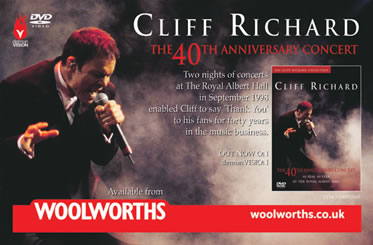
Just from looking at a dozen or so examples, it is clear that the described preliminary task can be tackled in various manners, as the way digipacks or (albums) are advertised do not always solely revolve around this particullar product. For instance the 'Cliff Richard 40th Anniversary Concert' advertisement shows an upcoming sow of his whilst at the same time announcing his venues, times and duration of his live show.

Digipack advertisements, do still appear within magazines such as 'Mojo' 'Kerrang' 'Word' and other mainstream music magazines, but the digipack itself is not shown to its full extent, this is left for the customer to see once they have purchased the album. Often the advertisement is published before the release date of the album itself to gather 'hype' and attraction to the album, depending on the scale and popularity of the artist.

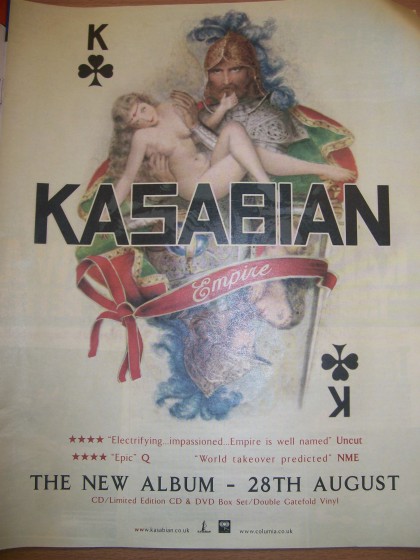
A common trait within the previously analysed packs, is that the album artwork is shown, clearly. Often the advertisement itself revolves around the portrayal of the artwork, catching the readers eye or not. The attraction of the band is second to the visual stimulation.

This brings me to my second note, being that the background and surrounding space on the standard A4 page (or in many cases A5 spread) along with another similiar advertisement or article is very important in the attention of readers as well as the feel of the advert. Whitespace is thought of very carefully, along with all other aspects defying the genre of the piece.

Planning Tips (Ancillary)

When planning for a music video, there are certain things that I think are vital to a smooth production. The majority of these involve, good time management and detailed organisation of what and when.

Having a music video can help promote your band, through video sites such as YouTube and MySpace. As well as by getting exposure on national television. If you're a film maker making a music video is a good way of getting exposure and experience and bands are often happy to give you a creative free reign. A video doesn't need to cost a fortune what's important is having a good idea and working within your budget. Production companies charge a fortune for even the simplest promo video, but you can easily do it yourself. First things first, however. You have to choose your song.
While it might make sense to make a video for your upcoming single there are a few other factors to consider:
  • It can take a lot longer than you think to make a video, so by the time it's finished your single might have come out. It might be an idea to think about making the video for a subsequent single.
  • Having said that, in these days of internet downloads, any track can be seen as a single, so there might be a track on the album that you have a great idea for a video for, even if that track wasn't originally planned as a single.
  • Remember that it can take a long time to shoot and edit each second of video so while you might have a good idea for a video for that 10 min epic that closes the album it might be more practical to shoot a video for the 3 min pop song.
The more planning you can do before hand the quicker you'll be able to shoot. If you're renting gear, the quicker you can shoot the less it will cost you, and if you're relying on favors, people will be more willing to help again if you keep the hanging around to a minimum. To plan, you should:
  • Draw story boards showing each scene and shot
  • List the crew, performers and props you'll need for each shot
  • Try and brief the camera and lighting people beforehand so they know what you want from the shot.
On the day of the shoot be prepared and organised. Keep a record of shots you've made; it'll make editing much easier. Always allow plenty of time for shooting - the finished shot may only last 10 seconds, but could easily take several hours to set up and shoot. When you're happy with a shot, if you have time, shoot it again. You can never have too much footage, and the retake may capture something that you hadn't noticed first time round. You'll have your plan and storyboard to follow, but remember that some of the best moments in a video can be unplanned. Keep the camera rolling – these days tape is cheap. For me personally keeping a record of the amount of shots we take is really important.

Wednesday, 15 February 2012

Digipack Research 2 - Conventions

I thought it was important to do some further research into different digipacks, and focus more on the connotations colours and more subtle aspects of the creation, so I found a slideshare doing so, and took some key points from it!

Friday, 10 February 2012

Narrative in Music Video

I recognize the importance of Narrative and aim to keep referencing back to this at later stages in production. Without narrative the story does not have meaning within the music video, which therefore removes value. Storyboards are a great tool also, below:
It is very important to form the Narrative within the Music Video, so me and my group have decided to follow the rules set from this slideshare to help us stick to a logical plana and pattern.